Class Content
Beyond assignments, your teacher can share extra learning material with your class — reference documents, study guides, lesson notes, and more. You can find all of it inside each class in your sidebar.
Class Resources
The Resources section of a class holds every file your teacher has shared with you. Open it from the sidebar under Classes → [your class] → Resources.
The page is a file explorer:
- Folders organise materials by topic, unit, or any structure your teacher chose
- Click any file to open it directly in your browser — PDFs, documents, and images all preview without leaving the page
- A sidebar lets you toggle between the file list and the document preview
Some files may not be available yet — your teacher can schedule resources to be released on a specific date (e.g. revision notes after a topic is taught). You'll see them appear as the release date passes.
Lessons
The Lessons section of a class groups related assignments and resources by topic or unit. Open it from the sidebar under Classes → [your class] → Lessons.
Each lesson card shows the lesson title and date. Click a card to open the lesson page, where you'll find:
- Any assignments your teacher has linked to the lesson
- Any resources specifically tied to this topic
- A Links & References section with any extra links your teacher has added
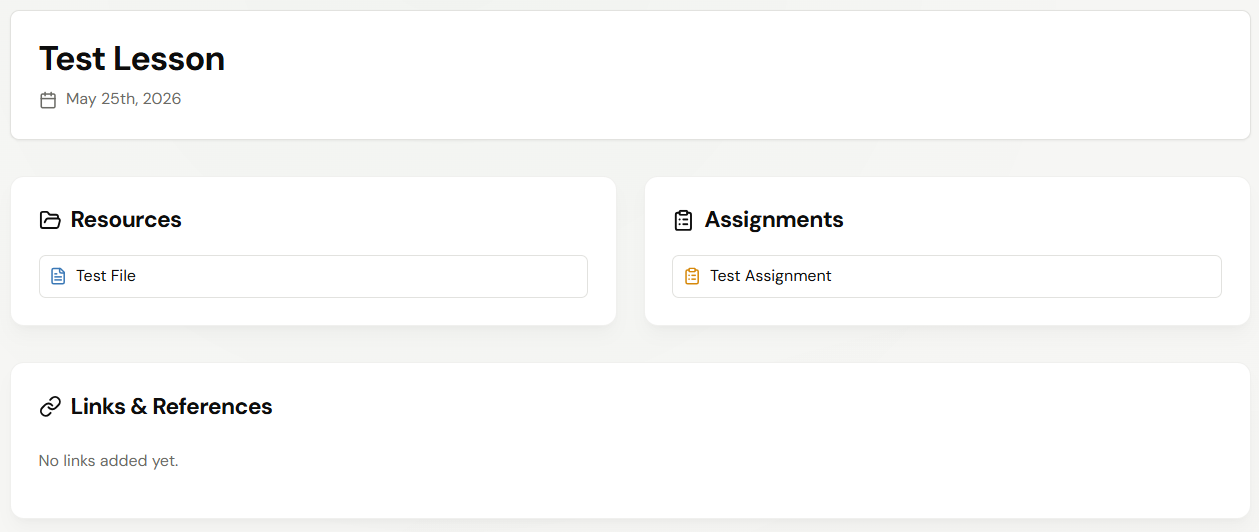
Lessons are useful for revision — instead of hunting for individual files, you can open a single lesson and see everything related to one topic in one place.
Live Interactive Sessions
If your teacher starts a real-time interactive session for a lesson, you'll see a prompt to join from the lesson page. These are live class activities your teacher runs alongside the regular lesson content — follow the join link when it appears.