Class Resources
Class Resources are materials you share with your students to support their learning — reference documents, study guides, supplementary readings, or any other files that complement what you teach in lessons. Resources live alongside assignments inside a class and can be released on a schedule or kept private to staff.
Adding a Class Resource
- Open the Classes tab in the sidebar and click on Class Resources in the navbar
- Click the
Uploadbutton to open the upload dialog. You'll see two options:- Privacy Status — toggle whether the file is visible to students or kept private to staff
- File/Folder Upload — select the file or folder you want to share (PDF, documents, etc.)
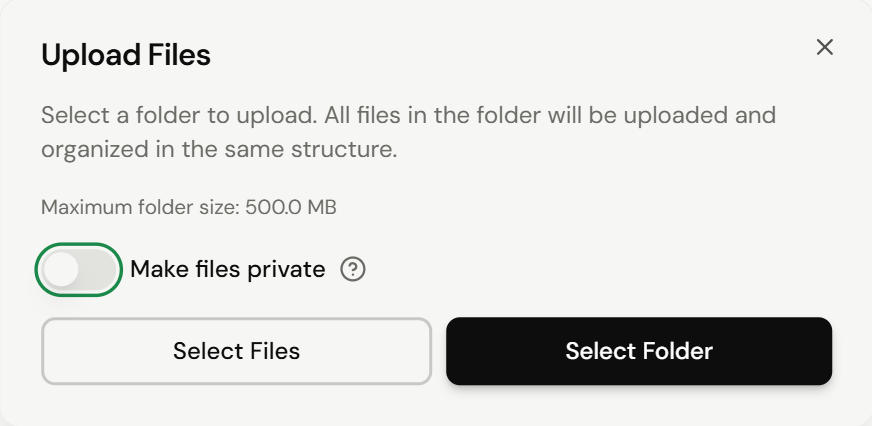
The file will then be uploaded and show up on your Files List.
Files can be renamed, moved, have their permissions changed, and deleted once uploaded. Hover the file and click the ... button to see these options.
Changing a File's Permissions
To change permissions on a file, select it and open the file menu via .... The Permissions option opens a menu where you can configure:
- The file's privacy status (visible / hidden from students)
- A release date (when the file should be made available for students to view)
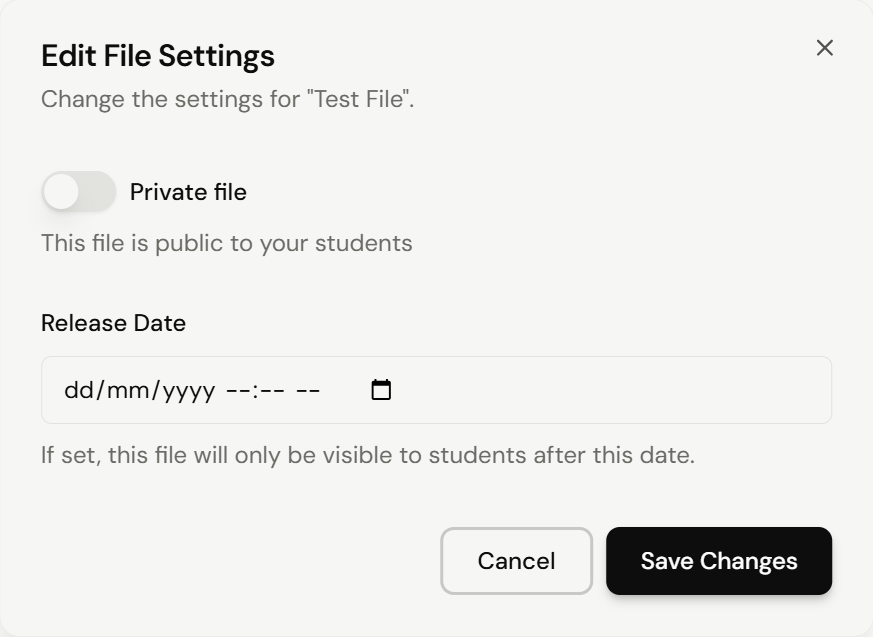
Use release dates to stage materials throughout a term — for example, uploading all unit handouts upfront but only revealing them as you reach each topic.